Last time on every line
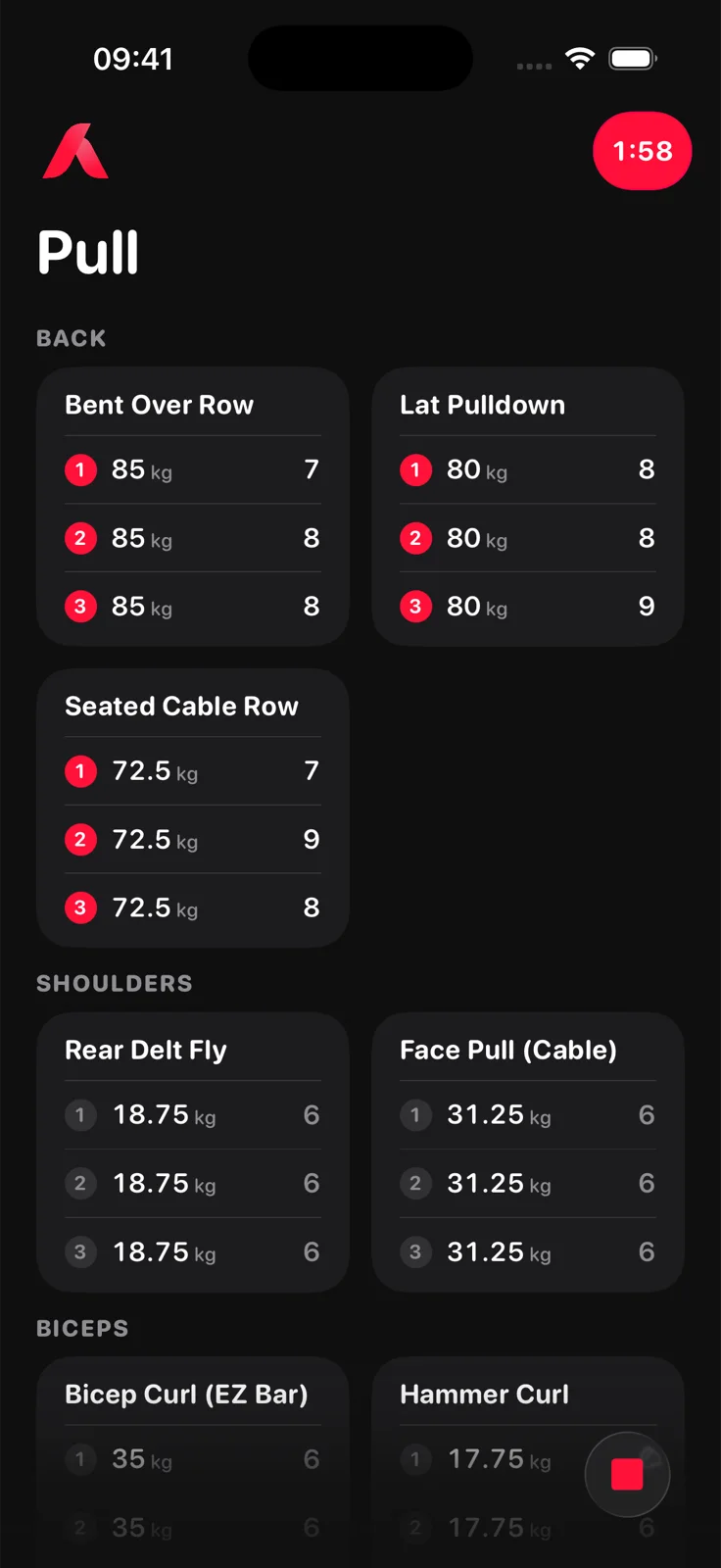
Each set line shows the weight and reps you did last session, so the target is right there while you lift.
Aveldo is a gym workout tracker for iPhone. Log your sets, reps and weights, follow your routines, track progressive overload and see how your strength develops over time.
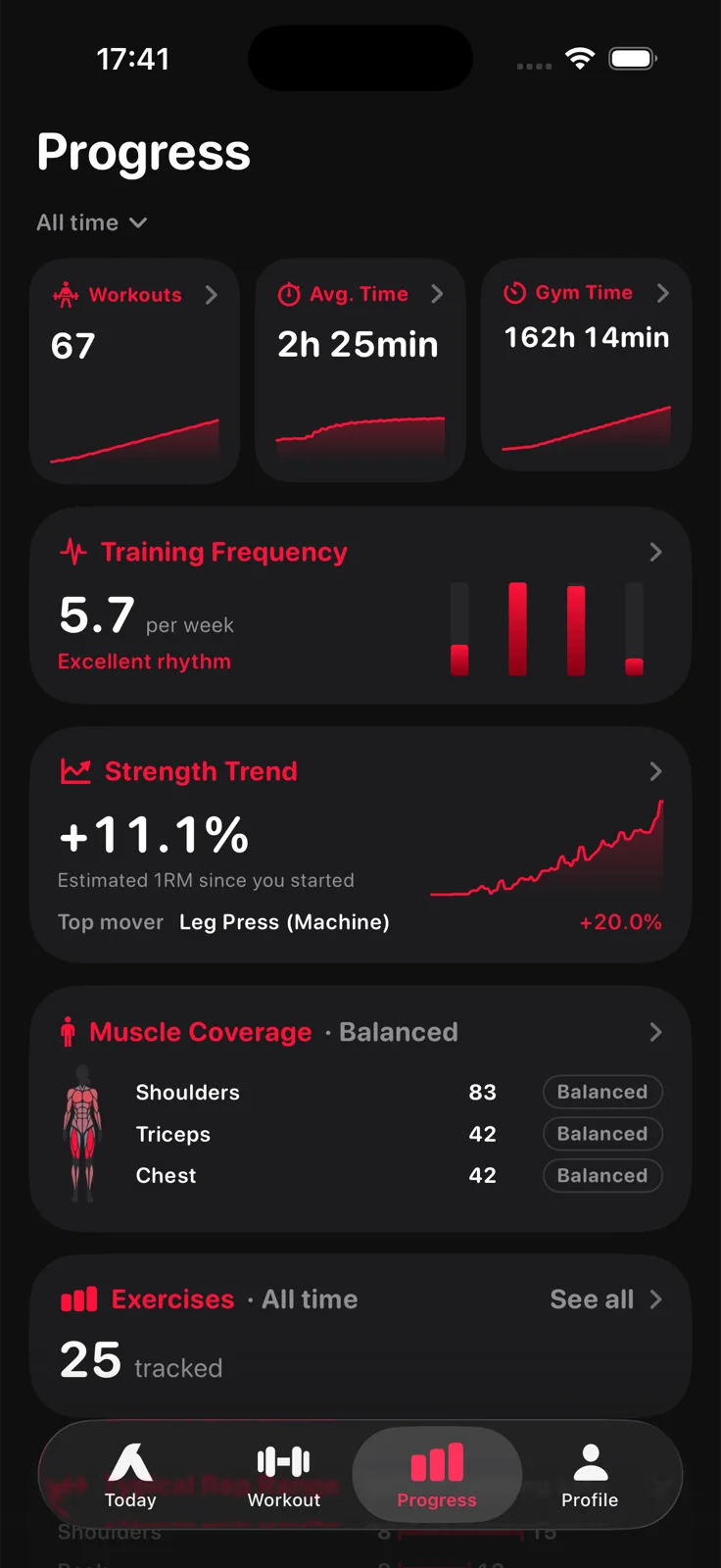
Aveldo is an iPhone workout tracker for logging gym sessions and seeing progress over time. Lifters log sets, reps and weights on one tile per exercise, follow their own routines, and get dedicated views for strength progress, workout consistency, muscle recovery and training history.
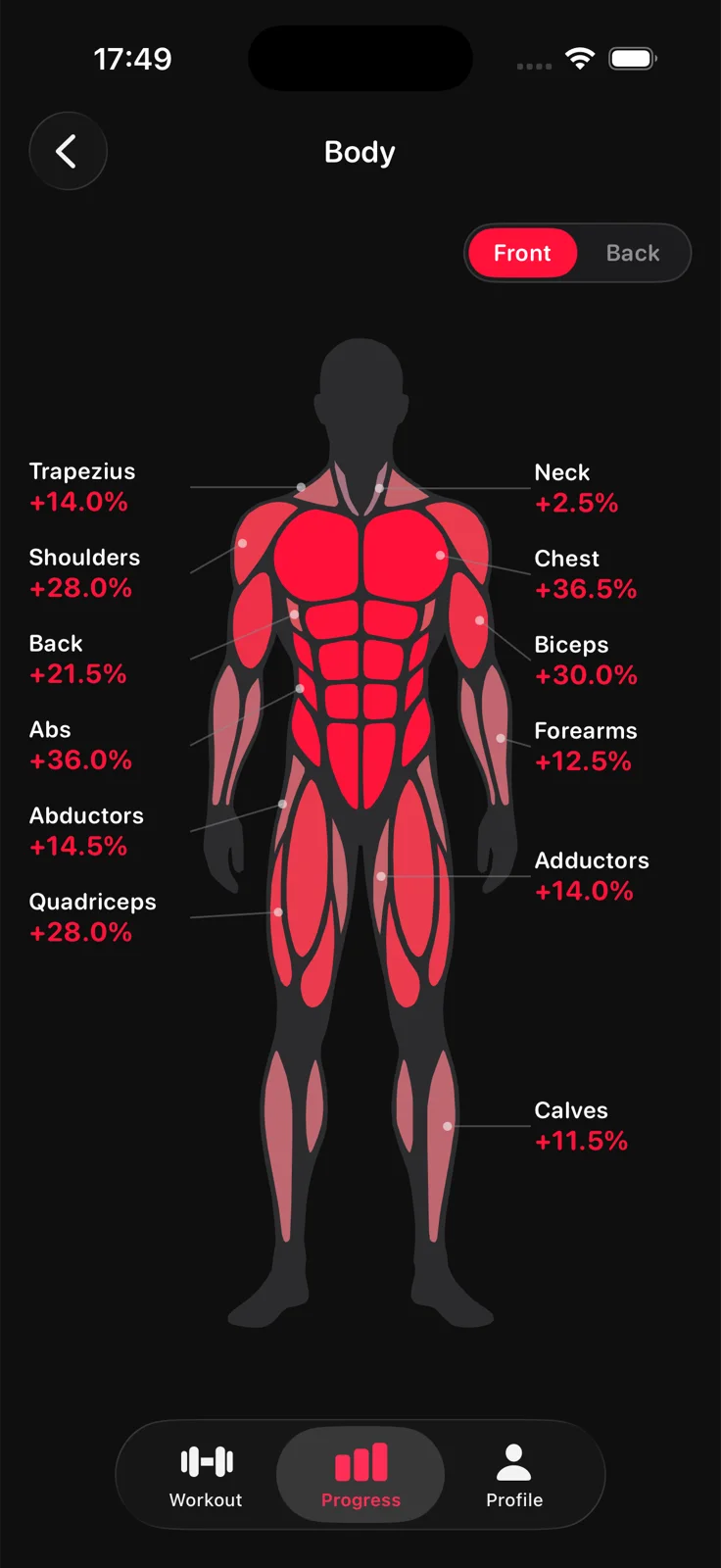
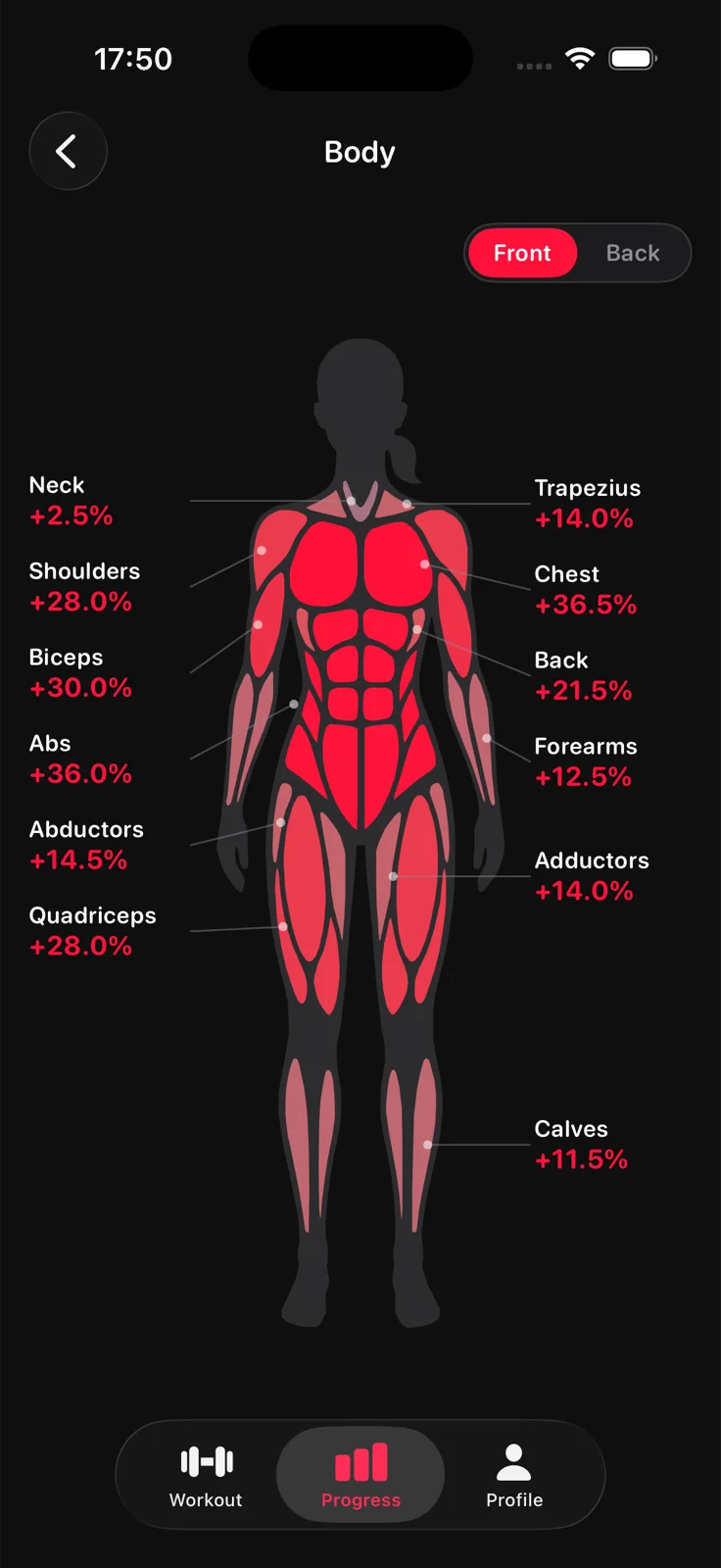
It is built for intermediate and advanced lifters who already know how to train and want a clear log and honest numbers, not exercise tutorials or a social feed. Every figure on the Progress screen is arithmetic on the sets you log: the strength trend is your estimated one rep max from the first session in the window to the latest, the body map shows that change per muscle group, and consistency is your training days against the weekly goal you set.
Open a routine, start the workout and type. Each exercise is one tile and each set one line with weight and reps. Your last session's numbers sit on every line, so you always know what you lifted last time and what to beat.
The Strength Trend on the Progress screen is your estimated one rep max, first session to latest, averaged across the exercises you train, and it names the lift that moved most. Every exercise has its own chart, and the Body screen shows the change per muscle group on a front and back figure.
Progressive overload means doing a little more over time: more weight, more reps or more sets for the same exercise. Aveldo makes each step visible.
Each set line shows the weight and reps you did last session, so the target is right there while you lift.
When you finish, Aveldo compares the workout with the previous session of the same routine: strength change, top improvements and new bests.
Reach the top of your rep range on a set and the next session's line comes back one increment heavier, already filled in.
The Strength Trend and the per exercise charts show whether the small steps add up.
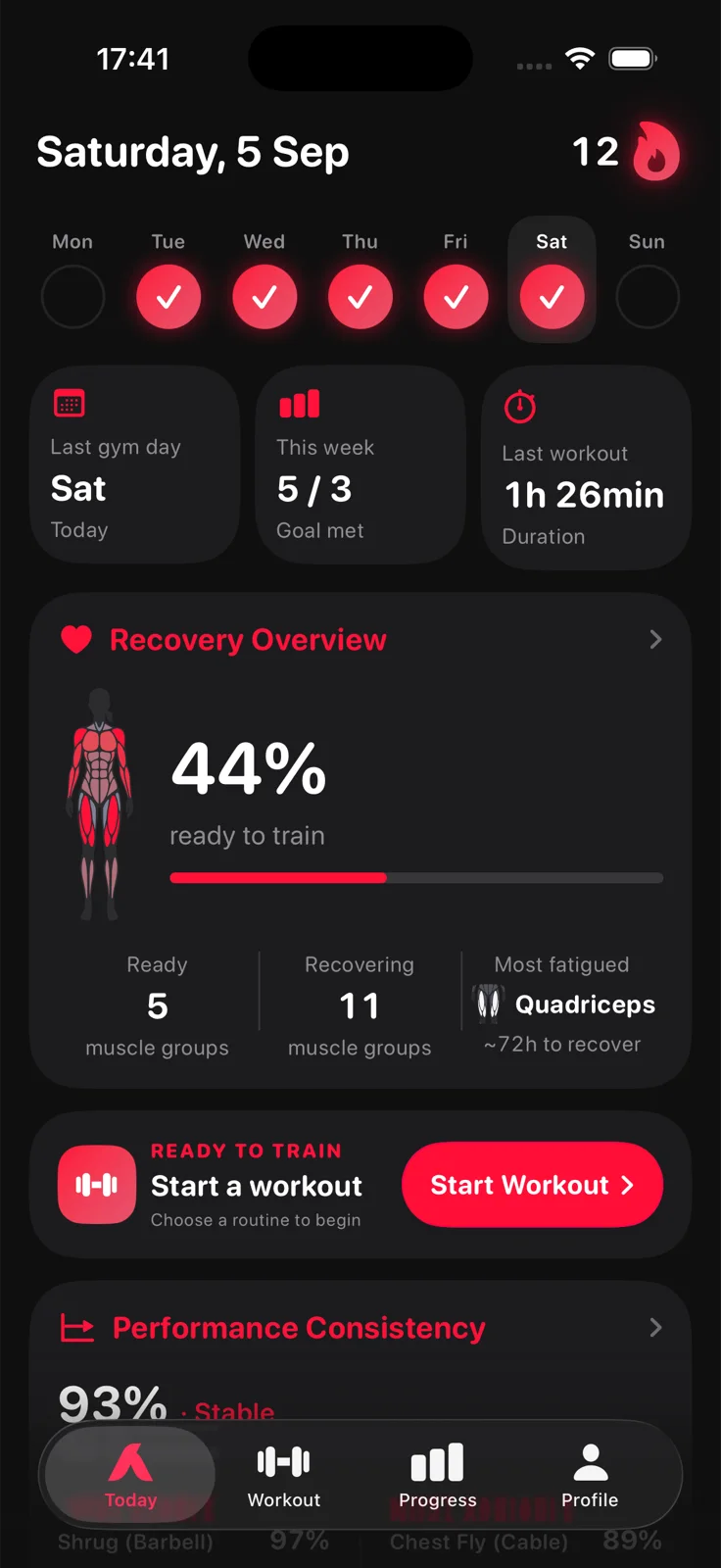
Set a weekly goal in training days. The Today screen shows the week's trained days, the streak of weeks you hit the goal, this week's count and your last workout. The Progress screen adds training frequency per week and total gym time.
Two things a gym tracker should handle without being asked: the rest between sets, and whether a muscle group is ready for the next session.
Log a set and the timer starts. It counts down in the corner of the workout screen, in the Dynamic Island and on the Lock Screen, for 15 seconds to 5 minutes.
Learn more ›Every set you log fatigues its muscle group, and time pays it back over about three days. The Today screen shows how many muscle groups are ready, which are recovering and which is most fatigued.
Learn more ›Aveldo has no exercise videos, no social feed and no programme to buy. It assumes you know the movements and gives you a fast log and honest numbers about it: what you lifted last time, what changed today, and whether the line is going up over months.
If you want to see whether your training is actually working, Aveldo is built for you. If you are looking for coaching, form tutorials or a community, other apps do that, and Aveldo does not try to.
Every screen answers one question. Nothing asks you to pick a programme before you can lift.
Logging is unlimited in the free version, and so are the rest timer, the streaks and the post workout comparison. Aveldo Pro adds unlimited routines, automatic weight increases, unlimited progress history, the advanced insights, cloud backup and sync, and CSV export.
| Feature | Free | Pro |
|---|---|---|
| Workout logging | Unlimited | Unlimited |
| Workout routines | Up to 4 | Unlimited |
| Custom exercises | Unlimited | Unlimited |
| Automatic rest timer | ✓ | ✓ |
| Weight increment | Manual | Automatic |
| Aveldo Push, a personalized line before each workout | — | ✓ |
| Routine readiness | — | ✓ |
| Workout reminders | ✓ | ✓ |
| Weekly streaks | ✓ | ✓ |
| Post workout comparison | ✓ | ✓ |
| Progress history | 90 days | Unlimited |
| Progress insights | Basic | Advanced |
| Peak Performance insights | — | ✓ |
| Body insights | Basic | Advanced |
| Cloud backup and sync | — | ✓ |
| Data export and import (CSV) | — | ✓ |
Aveldo Pro is available monthly, yearly or as a one time purchase. Pricing is shown in the app and on the App Store.
Aveldo is a gym workout tracker for iPhone. It logs sets, reps and weights, follows your routines and turns the log into progress views: a strength trend based on estimated one rep max, per exercise charts, a body map of strength change per muscle group, training frequency, weekly streaks and a muscle recovery overview.
Yes. Aveldo is a workout logging and progress tracking app. You record every set with its weight and reps, and Aveldo shows what changed against your last session and over time.
Yes. Every set line shows last session's weight and reps, the post workout comparison shows what improved, and the Strength Trend and exercise charts show the change over weeks. With Aveldo Pro, the weight can also increase automatically when you reach the top of your rep range. See the progressive overload tracker.
Yes. The rest timer starts automatically when you log a set, runs from 15 seconds to 5 minutes, and shows in the Dynamic Island and on the Lock Screen.
Yes. Aveldo is built for lifters who already know how to train. There are no exercise tutorials and no social feed, the log is fast with last time's numbers on every line, and the strength analytics are based on estimated one rep max rather than volume alone.
Yes. Aveldo is an iPhone app on the App Store and requires iOS 18.0 or later. There is no Android or web version.
No. Aveldo works without an account and stores your training on your iPhone. Signing in with Apple or Google is optional; with Aveldo Pro it enables cloud backup and sync between your devices.
Aveldo is free to download and use, including unlimited workout logging, routines, the rest timer, streaks and the post workout comparison. Aveldo Pro is an optional upgrade with unlimited routines, automatic weight increases, unlimited progress history, advanced insights, cloud backup and CSV export. Pricing is shown in the app and on the App Store.
Yes. Build routines from the built in exercise library or your own custom exercises and start the same routine every time. The free version holds up to four routines; Aveldo Pro removes the limit.

Free on the App Store for iPhone. No account needed to start.
Download on the App Store